Showing posts with label C#. Show all posts

Monday, March 16, 2015

DRF File and PCDOCS Link Handler for eDOCS DM

Couple years ago I created a handler for DRF files, OpenText eDOCS DM document links. The purpose of the tool was to give users the ability to open eDOCS DM documents in read-only mode if they (the users) do not want to install eDOCS DM Extensions.

Today I'm publishing the tool, its full source code, and some basic documentation:
EDocsLinkHandler

The best part of this package is, of course, the full source code (C# / .NET 4 / Visual Studio 2013). It's my implementation of DM WCF API helpers, and it even includes unit tests! :-)

Although the helpers only implement the logon, search, and document download functionality, they may serve as a starting point for anyone developing for DM with WCF API. After two years since the code was written, I still like it, maybe with the exception of the way I implemented the DMSearchResults class... Well, consider it as a free demo. Enjoy!

Wednesday, March 11, 2015

DM WCF AutoLogin Sample

I've put together some files in a folder on my Google Drive that
a) Demonstrate how to use eDOCS DM WCF API.
b) Illustrate the Auto Login vulnerability (security issue DM-32057), if your DM server is not patched.

The Creating Powerful eDOCS DM Client Step-by-step.pdf document describes how to start using DM WCF API in 7 simple steps.

Source.zip contains full source code (C# / .NET 4.5 / Visual Studio 2013) of the demo created with the instructions from the above document.

Demo.zip contains the executable compiled from the source code in Source.zip. You can launch it, if you don't want to recompile. Before launching the exe, you should open ConsoleApplication1.exe.config in Notepad and specify a) the name of your DM server (2 places); b) the user name in your DM library; c) the user's domain name.

Disclaimer: The instructions, source code and the executable are provided "as is", for demo purposes only and without warranty of any kind.

Wednesday, June 18, 2014

Memory Leaks in DM Service (DOCSFusion.exe)

It was the OpenText Technical Alert message sent out November 4, 2013 that drew my attention to memory leaks in DM Server:
In OpenText Document Management, eDOCS Edition (eDOCS DM) 5.3.1, with .NET Framework 4.0 installed on the client and server machines, the DM Server may stop responding. The tracking number for this issue is DM-31701.

The alert suggested installing .NET 4.5 as soon as possible to fix memory leaks.

I searched for known memory leaks in .NET 4.0, but couldn't find reports on any major issues. I then asked OpenText which specifically known issue in .NET 4.0 negatively impacts DM, but their answer was: "We tested with .NET 4.5 and couldn't detect memory leaks. You should install .NET 4.5 as recommended." Uh...

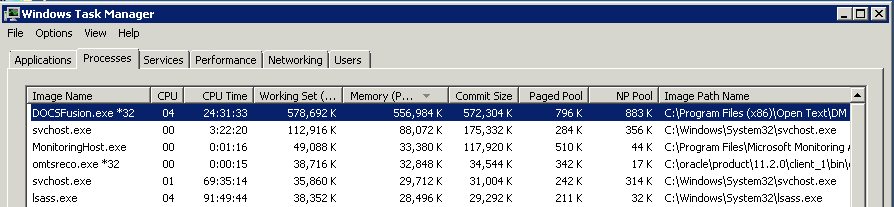
So I installed .NET Framework 4.5.1 on DM servers and started monitoring the memory of the DOCSFusion.exe process. It was soon noticed that memory consumption of DOCSFusion.exe is steadily increasing over time. Here is what I see now on a server:

This particular instance of DOCSFusion.exe was running for 20 days now and it climbed up to using 550 Mb of memory.

The issue was brought to OpenText Support Team's attention. After months of exchanging emails with OpenText Support and sending a ton of server and memory monitoring logs (OpenText has a special tool for this - WatchMemory.exe), I gave up on them admitting and fixing the issue.

This issue may be not critical in your environment, still you may want to keep your eye on it while monitoring your DM servers. The method I use for DOCSFusion.exe remote monitoring is checking the value of Process.WorkingSet64. Below is some C# code.


using System.Diagnostics;
...
public long MaxMemLimit = 800 * 1024 * 1024; // 800Mb
...
var procs = Process.GetProcessesByName(ProcessName, MachineName);
if(procs == null || procs.Length == 0)
    return new TestResult(false, null, subj,
        string.Format("Process {0} was not found on {1}.", ProcessName, MachineName), null);

var mem = procs.Max(p => p.WorkingSet64);
var isTestPassed = mem <= MaxMemLimit;

Tuesday, February 25, 2014

DM Server Log Parser Update

EDocsLogParser v1.0.3, a new version, has been uploaded to Drive and GitHub. I tuned up performance a bit and fixed OutOfMemoryException which occurred on some large (~1 GB) log files. The parser was tested on logs larger than 1.3 GB and it worked fine.

While working on these updates, I noticed that DM Server logs become messy when the load on the server increases: messages from different calls are often mixed on same lines. I did my best to resolve this mess in the log parser, but it couldn't be resolved completely. I added new unit tests with snippets from real logs, so you can see a part of that "having fun".

If I wrote the parser from the beginning now, I would based it on loading a whole log file as a single string and not breaking it by lines as I've implemented it. I give it up: I find the OpenText's product being buggy and a bit badly designed to spend too much time and passion on it. With this said, I'm quite happy with EDocsLogParser as it is: it extracts 99.99% of all SQL events out of a messy 1 GB log and this is more than enough for the tasks I intended it for:
How to Find Slow SQL Queries in eDOCS DM Server Logs
SQL Connection Cache Size for OpenText eDOCS DM Server

Sunday, December 29, 2013

eDOCS DM Server Log Parser - Part 3: Usage

This is the third part of the series about converting Hummingbird DM / OpenText eDOCS DM server logs to XML for further processing, e.g. for statistical analysis or for finding performance bottlenecks in SQL queries.

You can download the compiled tool from my Google drive. Here is the link: EDocsLogParser
The tool requires .NET Framework 4.0 or later, which I believe you already have on your Windows system.


Usage:
  1. Launch the EDocsLogParser application.
  2. Click the 'Directory...' button and select a folder with one or more log files from your DM server.
  3. Press the 'Start' button. 
  4. XML files will be created in the same directory where source DM logs are located and which you picked for processing.
Here is a sample result of the DM log file processing. A snippet from DM log:

DOCSSQL: [0ECE9D58] SQLObject at 10D48F58 acquired existing connection from pool #1

********** 13:59:28.871  [0ECE9D58] DOCSSQL: EXECute SQL Statement on Library:MYLIB - MYDB  (Oracle7) **********
Autocommit is ON

STATEMENT:
SELECT DOCSADM.APPS.APPLICATION,DOCSADM.APPS.DESCRIPTION,'AMBIENT_PROPERTY' UNK1,DOCSADM.APPS.SYSTEM_ID,'' FROM DOCSADM.APPS WHERE (SYSTEM_ID != 0) AND ((DOCSADM.APPS.APPLICATION = 'MS WORD')) AND (DOCSADM.APPS.DISABLED NOT IN ('Y','T','1') OR DOCSADM.APPS.DISABLED IS NULL) ORDER BY DOCSADM.APPS.APPLICATION ASC

TIMER:   [0ECE9D58] ODBCHandle::ReadItem(): 15 milliseconds  Fetched first row
DOCSSQL: [0ECE9D58] ODBCHandle::IssueCommand(): Statement returned results.  32 rows per fetch.  5248 bytes allocated for result sets.
TIMER:   [0ECE9D58] ODBCHandle::IssueCommand(): 22 milliseconds 
DOCSSQL: [0ECE9D58] ODBCHandle::ClearResults(): 1 row(s) fetched
DOCSSQL: [0ECE9D58] SQLObject at 10D48F58 released connection back to pool


The resultant XML file:

<?xml version="1.0"?>
<ArrayOfBaseEvent xmlns:xsi="http://www.w3.org/2001/XMLSchema-instance" xmlns:xsd="http://www.w3.org/2001/XMLSchema">

  <BaseEvent xsi:type="SqlEvent" key="0ECE9D58" connection="1" isNew="False">
    <Queries>
      <SqlQueryEvent time="13:59:28.871" readItemDuration="0.015" issueCommandDuration="0.022">
        <Command>SELECT DOCSADM.APPS.APPLICATION,DOCSADM.APPS.DESCRIPTION,'AMBIENT_PROPERTY' UNK1,DOCSADM.APPS.SYSTEM_ID,'' FROM DOCSADM.APPS WHERE (SYSTEM_ID != 0) AND ((DOCSADM.APPS.APPLICATION = 'MS WORD')) AND (DOCSADM.APPS.DISABLED NOT IN ('Y','T','1') OR DOCSADM.APPS.DISABLED IS NULL) ORDER BY DOCSADM.APPS.APPLICATION ASC</Command>
      </SqlQueryEvent>
    </Queries>
  </BaseEvent>
</ArrayOfBaseEvent>


Once you have an XML file, you can query data from it. In this case, XPath and PowerShell may be your best option. If you want to load the data into a data grid and visually transform it, try Microsoft Excel.

Alternatively, you may think about writing a program in .NET for log data processing. Please take the definition of the BaseEvent, SqlEvent, and SqlQueryEvent classes from EDocsLog.dll to load data effectively.

See Also:
eDOCS DM Server Log Parser - Part 1: Understanding the Task
eDOCS DM Server Log Parser - Part 2: Implementation

Saturday, December 28, 2013

eDOCS DM Server Log Parser - Part 2: Implementation

This is the second post about parsing Hummingbird DM / OpenText eDOCS DM server logs. Part #1 is here.

In this part I'm going to briefly explain the structure of the log parser just in case anyone may want to recompile, modify or extend it. However, if you simply want to get the DM Log Parser executable and use it, please feel free to jump directly to Part #3 - Usage of this article series.

The EDocsLogParser solution is implemented in C# / Visual Studio 2013 and consists of 3 projects.


EDocsLog is a Class Library and this is the core of the parser. The LogFile class represents a log file as a string array. The LogParser class is responsible for converting the log file into an array of events. It applies a set of predefined rules to the log lines. Rules are based on regular expressions. The rules return a RuleResult object, which tells the parser how to recognize event blocks (chunks) and to convert them into events. The result of the LogParser execution is an array of events. The events are serializable to XML via System.Xml.Serialization.
The parser performs two runs on a DM Server "raw" log file. On the first run, it applies the header and footer rules (see Part 1 for details about event blocks) and forms event stubs or chunks. The second run applies the inner or "body" rules to extract additional data from the recognized event block. The second run only processes the log lines within the previously found chunks. It also benefits from Task Parallel Library (TPL) for faster processing of the array of chunks.


EDocsLogParser is a WPF application. It allows you to pick a directory with DM Server logs and then to convert all of them into XML files. It calls the LogParser.Parse method for every log file and displays the progress.


EDocsLogTests is a set of unit tests for the EDocsLog classes.


Currently, the log parser can extract SQL events from a DM Server log file. It works for any log file, but, apparently, events will be extracted only if the log file was created with Log SQL, Log SQL & Calls, or Log All logging level:


Full source code of EDocsLogParser: https://github.com/dotnetnick/edocs/

Tuesday, December 17, 2013

Run Workflow Application Synchronously to Check the Completion State

If you come across this article, you are probably writing a Unit Test for your workflow, in which you need to know when workflow processing is completed. You also may want to examine the CompletionState value from the Complete event, otherwise you would use WorkflowInvoker instead of WorkflowApplication...

The solution turns out to be fairly simple: use ManualResetEvent. Okay, let's get to the code and that will be it:

using System.Activities;
using System.Threading;

[TestMethod]
public void TestExternalCancellationSimple() {
    var wf = new SomeActivity {
        ...
    };

    ActivityInstanceState state = ActivityInstanceState.Executing;
    var mre = new ManualResetEvent(false);

    var app = new WorkflowApplication(wf) {
        Completed = (e) => {
            state = e.CompletionState;
            mre.Set();
        }
    };
    app.Run();
    Thread.Sleep(500);  // wait a bit and then cancel the workflow
    app.Cancel();

    mre.WaitOne();

    Assert.AreEqual(ActivityInstanceState.Canceled, state);
}

UPDATE: Everything had been invented known even before we came in this world... Very similar code to the snippet above can be found in WF's Getting Started How to: Run a Workflow, with the only difference is that in MSDN they use AutoResetEvent, which is, technically speaking more correct, though doesn't make any difference if you call WaitOne only once.

Thursday, December 12, 2013

Unit Testing Workflows

Here comes my first Workflow in Unit Tests. I tend to think that "Dot Net" inevitably turns into "Brace Net"... :-)

[TestClass]
public class BackupTests {
    [TestMethod, ExpectedException(typeof(InvalidWorkflowException))]
    public void IndexArgumentMissingTest() {
        Activity backup = new BackupFilesActivity { Copier = new MockCopier() };
        var sequence = new Sequence { Activities = { backup } };
        WorkflowInvoker.Invoke(sequence);
    }

    [TestMethod, ExpectedException(typeof(MyException))]
    public void CopyFailsTest() {
        var index = new IndexInfo() { ID = 1 };
        Activity backup = new BackupFilesActivity { 
            Copier = new MockCopier(new MyException()),
        };
        var inputs = new Dictionary<string, object>() { { "Index", index } };
        WorkflowInvoker.Invoke(backup, inputs);
    }

    [TestMethod]
    public void MockCopyWorksTest() {
        var index = new IndexInfo() { ID = 1 };
        Activity backup = new BackupFilesActivity {
            Copier = new MockCopier(),
            Index = new InArgument<IndexInfo>((ctx) => index)
        };
        var sequence = new Sequence { Activities = { backup } };
        WorkflowInvoker.Invoke(sequence);
    }
}

Sunday, November 3, 2013

Trustees - How to Get or Set Access Rights to Documents in eDOCS DM

PCDDocObjectClass of DM API has a few methods to work with a document's trustees - the list of users or groups who have access to the document: FetchTrustees, GetTrustees, SetTrustees, UpdateTrustees, etc. eDOCS DM 5.3.1 DM API Reference Guide.pdf includes corresponding code samples.

Monday, October 28, 2013

Exception-based Error Reporting for DM API Helpers

As mentioned before, DM API calls are old-styled HRESULT functions, which return 0 (S_OK), to indicate the successful execution, or an error code. On the other hand, .NET developers commonly expect handling an exception, if something has gone wrong, not an error code.

Sunday, October 27, 2013

Managed Helper Classes (Library) for eDOCS DM API

OpenText (Hummingbird) eDOCS DM API is ActiveX-based. It looks like it's been written decades ago and it's quite "low-levelish". Error reporting is based on return codes and not on exceptions. And it's syntax is VB6-like that is common for ActiveX components.