Showing posts with label DM. Show all posts

Saturday, July 4, 2015

Closing OpenText eDOCS DM Series

'The Leader in Enterprise Information Management' is what the title of the www.opentext.com front page says. Well, it's hard to tell whether it's true or not, because OpenText is a very closed company: you won't find any open user or developer communities on their products; there is very little information on what their products are. What a potential customer is left to do is to trust the title and order a pre-sales presentation by calling the 1-800- number.

I really liked this blog post by OpenText CEO, especially that sentence in one of its first editions, where Mark Barrenechea said something like 'We at OpenText deeply care about security of our products', which had been then removed, possibly, because of the blog post was gathering low stars from readers...

In my opinion, each of these three security issues in OpenText EIM is sever, but if exploited in a combination, can put an enterprise on the knees. It's all up to a hacker's imagination and mercy.

OpenText: if you are reading my blog and have anything to say, the comments section is open. If you might have already fixed some or all issues described in this blog, please feel free to let me know and I'll be happy to add an update.

I wish OpenText customers the very best. I'm moving on and leaving eDOCS DM behind.

Friday, July 3, 2015

Auto Logon Security Hotfix Considerations

If OpenText released patches P6 and P1 for DM 5.3.1 and DM 10, I hadn't seen them. That's fine, my playground has changed and I've been away from supporting OpenText products. However, I analyzed the Auto Logon hotfix and this is what I found.

Yes, if you had custom code that relied on the Auto Logon feature (sample one and two), the hotfix would cause your code to stop working. However, the hotfix doesn't seem re-design the insecure architecture of the Auto Logon feature. What it does is the 'friend from foe' distinguishing, where the friend is OpenText's DM clients and the foe is any custom code with DM API.  Said differently, DM Server still allows DM Extensions to log in a user without sending the user's password or any security token obtained from an identity provider server or anything.  It seems simply checking for specific parameters that the client application sends on the logon.  It appears very similar to how DM Server still allows SQL Passthrough for DM Extensions when Allow SQL Passthrough is disabled.  Needless to say that this type of 'protection' is not too hard to work around by simply mimicking the behavior of the 'trusted' application (DM Extensions in this case).

Ask OpenText Support: how would you utilize the DM Server's Auto Logon feature in a custom built application with DM API?  And if they refuse to give you a code sample or say it's not available for custom applications or only OpenText DM Extensions have this feature, then this is it - a back door to the server, for DM Extensions use the same API as all other developers who write custom code for eDOCS DM.

Disclaimer:
The information here is, to my best knowledge, believed to be true and provided as-is and without any warranty of any kind.

Thursday, July 2, 2015

SQL Pass-Through Super Feature in eDOCS DM

DM API exposes a 'SQLService', the feature of eDOCS DM Server which allows a DM developer to execute SQL queries on DM database. At the first glance it may seem as a cool feature: a developer doesn't have to develop any specialized service for his own DM application extensions to get access to the database -- simply use DM API and enjoy the direct database access. I saw many custom built DM applications that employed this feature named SQL Passthrough. Developers love it!

All right, let's list what you can do with SQL Passthrough in eDOCS DM:

  • Run any SQL query on DM database server to the extent of DOCSADM database login permissions.
  • Being a very powerful login by default, DOCSADM allows you reading and modifying any data.
  • It also can read and modify database schema.
  • Create and execute database code, e.g. stored procedures.
  • If the database server is Oracle, DOCSADM can grant additional permissions to itself (by default it can).
  • Queries are anonymous at the database level. That is, it's impossible to distinguish DM Server's core functionality queries from those originated from DM Server's SQLService queries at the database server, because all of them are executed via the DOCSADM login.

There may be more. You name it.

Thus, if we look from the security perspective, this feature is a huge security issue. Not for the fact that it is SQL injection prone, and not because it has no security access control, that could be either impersonation or a dedicated database login for such queries. The main security issue comes from the fact that you are not the only developer for your enterprise document management system. Potentially any DM user can bring his own custom built application and run SQL queries against the DM database.

In theory, by exploiting the SQL Passthrough feature, a hacker can even gain control over your Windows Server where DM Server is running: change an existing document's path stored in the database to the server's local path and upload an executable to that location via DM Extensions or DM API as an 'existing version' of the 'document'.

Just to sum it up, DM API SQL Service allows execution of arbitrary code on the DM database anonymously, and it cannot be disabled (see below). If you ever see such a 'feature' in an end-user product, EIM in this case, run away from it as if it is a wildfire.

Well, there is Allow SQL Passthrough in server options and eDOCS DM Administration Guide warns about potential security risk when enabling it. The checkbox in the server settings and the warning in the documentation may make one think that when Allow SQL Passthrough is unchecked, the feature is disabled. No, it's not.

OpenText (Hummingbird) developers had created SQL Passthrough for themselves in the first place and not for third-party DM developers as one may think. From DM Server logs you can see that eDOCS DM Extensions makes calls to SQLService, even if Allow SQL Passthrough is disabled. To accomplish this, DM Extensions always sends a constant string application name and a GUID to the server along with a user's login credentials. The application name and GUID are supposed to be a secret, but when OpenText sent out a customer alert regarding the Auto Logon security breach, they seemed so scared at that time, that were offering the GUID to anyone who would request it from OpenText Support. The application name and GUID - the so-called license key - that DM Extensions uses to unlock the full potential of DM API is very easy to discover by debugging the DM WCF Service. A hacker doesn't really need to ask OpenText for it. And it doesn't have to be a public knowledge to qualify as a security breach. It simply exists and OpenText cannot easily change these secrets because of their backward compatibility commitments.

Overall this SQL Passthrough is a huge security issue and, unfortunately, you, as a DM Administrator, cannot completely address it. However, there are still some things you can and should do to lower the risk of your enterprise documents destroyed or stolen:
  1. Disable Allow SQL Passthrough in server settings. It's insufficient as explained above, but at least you'll cut off lazy hackers who don't care about the secret GUID.
  2. Closely monitor the Application Event Log on your DM Server: If a SQL query ends with an error, the error is added to the log. You should analyze errors for suspicious queries. The challenges are A) DM Extensions generates a few queries which always yield an error - you'll need to filter out those and B) An intruder may be smart enough to ensure his SQL queries are correct and won't fail in your environment.
  3. Enable DM Server logs and monitor them in real-time for any calls to SQLService. You will need to find a way to distinguish calls made by DM Extensions or DM Webtop from those by an intruder.
  4. Work with DBA and tighten DOCSADM login permissions as much as possible: no schema updates, no permission grants, etc.
That's about it...

Disclaimer:
The information here is provided as-is and without any responsibility of any kind. It is intended for eDOCS DM Administrators to help them understand the security issue and find ways of addressing it. The facts given are deemed true for eDOCS DM 5.3.1 P5 / DM 10 and earlier versions.

Thursday, March 12, 2015

eDOCS DM Auto Logon Security Issue - FAQ for DM administrators

Foreword:  Earlier today OpenText released a hotfix for this issue. The security hotfix is not available to me and I cannot test it. I hope it works well. Below is my version of FAQ on the Auto Logon Security issue.

Q. Which DM versions are affected by issue DM-32057?
A. All (DM 10 prior to P1, 5.3.1 P5b and earlier, 5.3.0 P5 RU5 and earlier).

Q. What can an intruder do to my library through the Auto Logon breach?
A. It depends on the intruder's goals and imagination. He/she can just sneak into the library and quietly read others documents or he/she can quickly scramble the entire library by replacing real documents with garbage through random logins. OpenText has rated the vulnerability as HIGH. A very good explanation was also given to what HIGH means.

Q. Can I detect an intruder?
A. I'm afraid you cannot. The only method I know is to enable server logs on all your DM servers and watch for suspicious activity by parsing the logs in the real time. The problem is that no one knows which suspicious activity to expect... If a user comes to you and says that the document history shows that she opened the document, which she did not, you'd better believe her than questioning her memory.

Q. Then what should I do to mitigate the vulnerability?
A. Disable Auto Logon in your DM environment as the DM-32057 bulletin suggests.

Q. Will my users like it?
A. No, they will likely hate you for this. They won't be able to understand why DM is the only application that constantly asks them for a password.

Q. Our users' Windows accounts are now locked more often after I disabled Auto Logon. Why?
A. Ask your users to be more accurate when entering their passwords. The DM Server does not tolerate carelessness.

Q. Can I disable the DM WCF service instead of disabling the Auto Logon feature?
A. You can, but this is insufficient. By disabling the WCF Host service you essentially disable the two out of three communication endpoints – HTTP and Net.TCP; the DCOM endpoint remains and can be utilized for an attack. Moreover, by disabling endpoints you reduce the DM Server's availability to your honest clients. UPD: DM WCF Service publishes 5 endpoints, not 2, in DM 5.3.1.

Q. Is it easy for OpenText to fix the issue in eDOCS DM?
A. Probably it was. A hotfix has been released for DM 5.3.x and DM 10. UPD: my opinion on the hotfix.

Q. Did OpenText know about this issue before?
A. They knew about it since 2013.

Q. Why didn't they fix it then?
A. I think they wanted to release DM 10 first. However, you should ask them, not me.

Q. I'm a hacker. The DM admin has just disabled the Auto Logon feature and I no longer can use other users’ logins... :(
A. Oh, man, I feel for you... Well, you can re-enable Auto Logon via the SQL Passthrough by executing a query like the one shown below using DM API:

  UPDATE DOCSADM.DOCSPARMS SET AUTO_LOGIN='Y'

Hey, DM admin: this is a good example of suspicious activity you must be watching for if you care.

Q. Is Auto Logon the only security breach in eDOCS DM?
A. No, it is not. More issues exist. Here are the other two.

Tuesday, March 10, 2015

DM-32057

Finally Earlier today OpenText sent a security alert to its customers:

A security vulnerability has been discovered in OpenText Document Management, eDOCS Edition (eDOCS DM) that could allow an attacker to compromise the authentication mechanisms in eDOCS. This vulnerability is rated as HIGH.

"To compromise" is a bold declaration, considering the way "the authentication mechanism" is implemented in eDOCS DM!

Out of two solutions that the bulletin suggests, only one directly relates to the issue and is applicable.

The other "solution" consists of two parts, one of which doesn't fully shut the vulnerability and the other has nothing to do with it. It's a different story how the SQL Passthrough feature might get into the bulletin. I shall tell it to you one day. Overall, it looks like OpenText security specialists do not know their own product well enough...

Wednesday, June 18, 2014

Memory Leaks in DM Service (DOCSFusion.exe)

It was the OpenText Technical Alert message sent out November 4, 2013 that drew my attention to memory leaks in DM Server:
In OpenText Document Management, eDOCS Edition (eDOCS DM) 5.3.1, with .NET Framework 4.0 installed on the client and server machines, the DM Server may stop responding. The tracking number for this issue is DM-31701.

The alert suggested installing .NET 4.5 as soon as possible to fix memory leaks.

I searched for known memory leaks in .NET 4.0, but couldn't find reports on any major issues. I then asked OpenText which specifically known issue in .NET 4.0 negatively impacts DM, but their answer was: "We tested with .NET 4.5 and couldn't detect memory leaks. You should install .NET 4.5 as recommended." Uh...

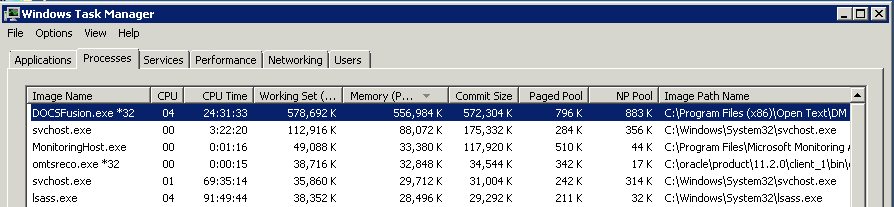
So I installed .NET Framework 4.5.1 on DM servers and started monitoring the memory of the DOCSFusion.exe process. It was soon noticed that memory consumption of DOCSFusion.exe is steadily increasing over time. Here is what I see now on a server:

This particular instance of DOCSFusion.exe was running for 20 days now and it climbed up to using 550 Mb of memory.

The issue was brought to OpenText Support Team's attention. After months of exchanging emails with OpenText Support and sending a ton of server and memory monitoring logs (OpenText has a special tool for this - WatchMemory.exe), I gave up on them admitting and fixing the issue.

This issue may be not critical in your environment, still you may want to keep your eye on it while monitoring your DM servers. The method I use for DOCSFusion.exe remote monitoring is checking the value of Process.WorkingSet64. Below is some C# code.


using System.Diagnostics;
...
public long MaxMemLimit = 800 * 1024 * 1024; // 800Mb
...
var procs = Process.GetProcessesByName(ProcessName, MachineName);
if(procs == null || procs.Length == 0)
    return new TestResult(false, null, subj,
        string.Format("Process {0} was not found on {1}.", ProcessName, MachineName), null);

var mem = procs.Max(p => p.WorkingSet64);
var isTestPassed = mem <= MaxMemLimit;

Wednesday, June 4, 2014

OpenText eDOCS DM Server Issues Every Administrator Must Be Aware Of


If everything seems to be going well, 
you have obviously overlooked something.
Basic Murphy's Laws

There are quite a few things an eDOCS DM administrator must be aware of and keep them under strict control to avoid the surprise of end-users calling and telling that DM isn't working for them. Here are my favorite.

Memory leaks in the DM service process
DOCSFusion.exe is leaking memory. The memory consumption steadily grows until it becomes critical, at which point you'd better restart the DM service than let your entire server to go down.

Database connection leaks
The DOCSFusion process manages a pool of database connections. Once in a while the pool manager goes mad and stops releasing database connections. Soon after that DM becomes extremely slow to end-users and can even crash.

Indexer sticks and stops progressing
As the subject says, the indexing appears to be working, but in fact it's not: all services are running and not reporting any errors, however, the index database files are not being updated. You have to restart the DM services on the server to give the indexer a kick to keep going.

These issues I observe with the most recent version of OpenText eDOCS DM: v5.3.1 Patch 5. I shall write separate blog posts on each of them to describe the "early-warning" detection methods I use in hope it would help other DM administrators...